配置参考
Cyberstrike 可以通过多种方式配置:配置文件、环境变量和命令行参数。本参考涵盖所有配置选项。
📸 SCREENSHOT: s13-config-structure.png
配置文件结构
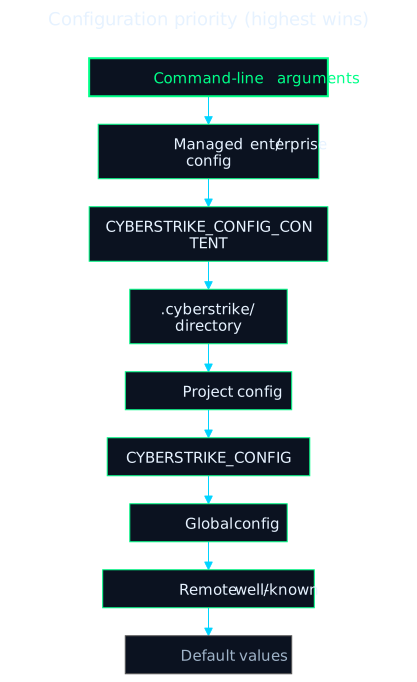
配置层级
配置源按优先级顺序合并(最高优先级胜出):
- 命令行参数
- 托管(企业)配置——托管目录中管理员控制的
cyberstrike.json/cyberstrike.jsonc CYBERSTRIKE_CONFIG_CONTENT环境变量(内联 JSON).cyberstrike/目录配置——项目的.cyberstrike/,然后是主目录中的~/.cyberstrike/- 项目配置(
./cyberstrike.json或./cyberstrike.jsonc,从工作目录向上搜索) - 自定义配置路径(
CYBERSTRIKE_CONFIG) - 全局配置(
~/.config/cyberstrike/config.json、cyberstrike.json或cyberstrike.jsonc) - 远程 / well-known 配置
- 默认值
检查配置
要查看所有源合并后的有效配置,运行:
cyberstrike debug config这会将解析后的配置打印为 JSON。没有 config get/set 命令——通过直接编辑配置文件来更改设置(见下文)。
配置文件
项目配置
在项目根目录创建 cyberstrike.json 或 cyberstrike.jsonc:
{ "$schema": "https://cyberstrike.io/config.json", "model": "anthropic/claude-sonnet-4-20250514", "agent": { "web-application": { "model": "anthropic/claude-sonnet-4-20250514" } }}全局配置
在 ~/.config/cyberstrike/ 中存储用户级设置。config.json、cyberstrike.json 或 cyberstrike.jsonc 任一都会被加载(Cyberstrike 自动生成 config.json):
{ "$schema": "https://cyberstrike.io/config.json", "theme": "cyberstrike", "autoupdate": true, "share": "manual"}项目目录结构
创建 .cyberstrike/ 目录进行有组织的配置:
.cyberstrike/├── cyberstrike.json # 项目配置├── agents/ # 自定义代理│ └── security.md├── commands/ # 自定义命令│ └── scan.md├── plugins/ # 自定义插件│ └── my-plugin.ts└── modes/ # 自定义模式(已弃用)核心设置
模型选择
设置默认 AI 模型:
{ "model": "anthropic/claude-sonnet-4-20250514"}格式:provider/model-name
轻量模型
设置用于轻量任务(标题生成)的模型:
{ "small_model": "anthropic/claude-haiku-4-5-20251001"}默认代理
设置默认安全代理:
{ "default_agent": "cyberstrike"}用户名
覆盖系统用户名:
{ "username": "pentester"}主题
设置界面主题:
{ "theme": "cyberstrike"}提供商配置
单独配置 AI 提供商:
{ "provider": { "anthropic": { "options": { "apiKey": "{env:ANTHROPIC_API_KEY}", "timeout": 300000 } }, "openai": { "options": { "baseURL": "https://api.openai.com/v1" }, "whitelist": ["gpt-4o", "gpt-4-turbo"], "blacklist": ["gpt-3.5-turbo"] }, "custom-provider": { "id": "custom-provider", "name": "Custom Provider", "options": { "baseURL": "https://api.custom.example.com/v1", "apiKey": "{env:CUSTOM_API_KEY}" } } }}提供商选项
| 选项 | 类型 | 描述 |
|---|---|---|
apiKey | string | 认证用的 API 密钥 |
baseURL | string | 自定义 API 端点 |
timeout | number/false | 请求超时时间(毫秒,默认:300000) |
setCacheKey | boolean | 启用提示缓存键 |
enterpriseUrl | string | 用于 Copilot 的 GitHub Enterprise URL |
模型筛选
控制显示哪些模型:
{ "provider": { "openai": { "whitelist": ["gpt-4o", "o1-preview"], "blacklist": ["gpt-3.5-turbo"] } }}禁用提供商
禁用特定提供商:
{ "disabled_providers": ["ollama", "groq"]}仅启用特定提供商:
{ "enabled_providers": ["anthropic", "openai"]}代理配置
配置代理行为:
{ "agent": { "cyberstrike": { "model": "anthropic/claude-sonnet-4-20250514", "temperature": 0.7, "steps": 50, "color": "#FF5733" }, "web-application": { "model": "anthropic/claude-opus-4-20250514", "prompt": "Focus on OWASP Top 10 vulnerabilities" } }}代理选项
| 选项 | 类型 | 描述 |
|---|---|---|
model | string | 为此代理覆盖模型 |
temperature | number | 模型温度(0-1) |
top_p | number | Top-p 采样值 |
steps | number | 最大代理迭代次数 |
prompt | string | 自定义系统提示词 |
color | string | 十六进制颜色代码(#RRGGBB) |
description | string | 代理描述 |
mode | string | 代理模式:“primary”、“subagent”、“all” |
hidden | boolean | 从自动补全中隐藏 |
disable | boolean | 禁用此代理 |
创建自定义代理
创建 .cyberstrike/agents/custom.md:
---description: Custom security agent for API testingmodel: anthropic/claude-opus-4-20250514mode: primary---
You are an API security specialist. Focus on:- Authentication vulnerabilities- Authorization bypass- Input validation- Rate limiting issues
MCP 配置
配置 Model Context Protocol 服务器:
{ "mcp": { "filesystem": { "type": "local", "command": ["npx", "@modelcontextprotocol/server-filesystem", "/path/to/dir"], "enabled": true, "timeout": 5000 }, "remote-api": { "type": "remote", "url": "https://api.example.com/mcp", "oauth": { "clientId": "your-client-id", "scope": "read write" } } }}本地 MCP 服务器
| 选项 | 类型 | 描述 |
|---|---|---|
type | “local” | 服务器类型 |
command | string[] | 命令和参数 |
environment | object | 环境变量 |
enabled | boolean | 启用/禁用服务器 |
timeout | number | 请求超时时间(毫秒) |
远程 MCP 服务器
| 选项 | 类型 | 描述 |
|---|---|---|
type | “remote” | 服务器类型 |
url | string | 服务器 URL |
headers | object | 请求头 |
oauth | object/false | OAuth 配置 |
enabled | boolean | 启用/禁用服务器 |
timeout | number | 请求超时时间(毫秒) |
OAuth 配置
{ "oauth": { "clientId": "your-client-id", "clientSecret": "your-client-secret", "scope": "read write" }}权限配置
控制工具权限:
{ "permission": { "bash": "ask", "edit": "allow", "read": "allow", "glob": "allow", "grep": "allow", "websearch": "deny" }}权限操作
| 操作 | 描述 |
|---|---|
ask | 提示用户批准(默认) |
allow | 无需询问自动批准 |
deny | 阻止工具使用 |
基于模式的权限
按模式指定权限:
{ "permission": { "bash": { "*": "ask", "ls *": "allow", "rm -rf *": "deny" }, "edit": { "*": "ask", "*.md": "allow" } }}可用权限键
| 键 | 描述 |
|---|---|
read | 文件读取 |
edit | 文件编辑/写入 |
glob | 文件模式匹配 |
grep | 内容搜索 |
list | 目录列表 |
bash | 命令执行 |
task | 任务执行 |
websearch | Web 搜索 |
webfetch | URL 获取 |
lsp | LSP 操作 |
external_directory | 项目外访问 |
按键绑定
自定义键盘快捷键:
{ "keybinds": { "leader": "ctrl+x", "app_exit": "ctrl+c,ctrl+d", "session_new": "<leader>n", "session_list": "<leader>l", "model_list": "<leader>m", "agent_list": "<leader>a", "input_submit": "return", "input_newline": "shift+return,ctrl+return" }}按键格式
- 单键:
ctrl+c、escape、return - 多绑定:
ctrl+c,ctrl+d(逗号分隔) - Leader 序列:
<leader>n(使用 leader 键) - 禁用:
none
TUI 设置
配置终端界面:
{ "tui": { "scroll_speed": 1.0, "scroll_acceleration": { "enabled": true }, "diff_style": "auto" }}| 选项 | 类型 | 描述 |
|---|---|---|
scroll_speed | number | 滚动速度倍数 |
scroll_acceleration | object | 加速设置 |
diff_style | “auto”/“stacked” | Diff 渲染风格 |
服务器配置
配置 API 服务器:
{ "server": { "port": 4096, "hostname": "localhost", "mdns": true, "cors": ["https://example.com"] }}插件与钩子
Cyberstrike 不使用基于配置的钩子系统。自动化和生命周期钩子实现为插件——订阅 tool.execute.before、tool.execute.after 或 permission.ask 等事件的 JavaScript/TypeScript 模块。
按名称注册插件。它们从 npm 或从 .cyberstrike/ 中的本地 {plugin,plugins}/ 目录解析:
{ "plugin": ["my-plugin", "@scope/another-plugin"]}完整事件列表和编写指南请参阅钩子与插件。
实验性选项
experimental 块暴露可选功能:
{ "experimental": { "batch_tool": true, "openTelemetry": false, "continue_loop_on_deny": false, "mcp_timeout": 5000 }}| 选项 | 类型 | 描述 |
|---|---|---|
disable_paste_summary | boolean | 禁用粘贴摘要 |
batch_tool | boolean | 启用批量工具 |
openTelemetry | boolean | 为 AI SDK 调用启用 OpenTelemetry spans |
primary_tools | string[] | 仅主代理可用的工具 |
continue_loop_on_deny | boolean | 工具调用被拒绝时继续代理循环 |
mcp_timeout | number | MCP 请求超时时间(毫秒) |
分享配置
控制会话分享:
{ "share": "manual"}| 值 | 描述 |
|---|---|
manual | 仅通过命令分享 |
auto | 自动分享新会话 |
disabled | 禁用所有分享 |
压缩设置
配置上下文压缩:
{ "compaction": { "auto": true, "prune": true }}| 选项 | 描述 |
|---|---|
auto | 上下文满时自动压缩 |
prune | 修剪旧的工具输出 |
环境变量
配置变量
| 变量 | 描述 |
|---|---|
CYBERSTRIKE_CONFIG | 自定义配置文件路径 |
CYBERSTRIKE_CONFIG_CONTENT | 内联 JSON 配置 |
CYBERSTRIKE_CONFIG_DIR | 附加配置目录 |
CYBERSTRIKE_DISABLE_PROJECT_CONFIG | 忽略项目配置 |
CYBERSTRIKE_PERMISSION | JSON 权限覆盖 |
提供商 API 密钥
| 变量 | 提供商 |
|---|---|
ANTHROPIC_API_KEY | Anthropic |
OPENAI_API_KEY | OpenAI |
GOOGLE_GENERATIVE_AI_API_KEY | Google (Gemini) |
OPENROUTER_API_KEY | OpenRouter |
AWS_ACCESS_KEY_ID | AWS Bedrock |
AZURE_API_KEY | Azure OpenAI |
行为标志
| 变量 | 描述 |
|---|---|
CYBERSTRIKE_AUTO_SHARE | 自动分享会话 |
CYBERSTRIKE_DISABLE_AUTOCOMPACT | 禁用自动压缩 |
CYBERSTRIKE_DISABLE_PRUNE | 禁用输出修剪 |
变量替换
环境变量
在配置中引用环境变量:
{ "provider": { "anthropic": { "options": { "apiKey": "{env:ANTHROPIC_API_KEY}" } } }}文件引用
包含文件内容:
{ "instructions": ["{file:./SECURITY.md}"]}支持:
- 相对路径:
{file:./path/to/file} - 绝对路径:
{file:/absolute/path} - 主目录:
{file:~/path/from/home}
LSP 配置
配置语言服务器协议:
{ "lsp": { "typescript": { "command": ["typescript-language-server", "--stdio"], "extensions": [".ts", ".tsx"] }, "rust": { "disabled": true } }}设置 lsp: false 禁用所有 LSP 功能。
格式化器配置
配置代码格式化器:
{ "formatter": { "prettier": { "command": ["prettier", "--write"], "extensions": [".ts", ".tsx", ".js", ".jsx"] }, "rustfmt": { "disabled": true } }}设置 formatter: false 禁用所有格式化器。
完整示例
{  "$schema": "https://cyberstrike.io/config.json",  "model": "anthropic/claude-sonnet-4-20250514",  "small_model": "anthropic/claude-haiku-4-5-20251001",  "default_agent": "cyberstrike",  "theme": "cyberstrike",  "share": "manual",  "autoupdate": "notify",
  "provider": {    "anthropic": {      "options": {        "timeout": 300000      }    }  },
  "agent": {    "web-application": {      "model": "anthropic/claude-opus-4-20250514",      "steps": 100    }  },
  "permission": {    "bash": "ask",    "edit": "allow",    "read": "allow"  },
  "mcp": {    "filesystem": {      "type": "local",      "command": ["npx", "@modelcontextprotocol/server-filesystem", "."],      "enabled": true    }  },
  "keybinds": {    "leader": "ctrl+x"  },
  "compaction": {    "auto": true,    "prune": true  }}