구성 레퍼런스
Cyberstrike는 설정 파일, 환경 변수, 명령줄 인수 등 여러 방법으로 구성할 수 있습니다. 이 레퍼런스는 모든 구성 옵션을 다룹니다.
📸 SCREENSHOT: s13-config-structure.png
설정 파일 구조
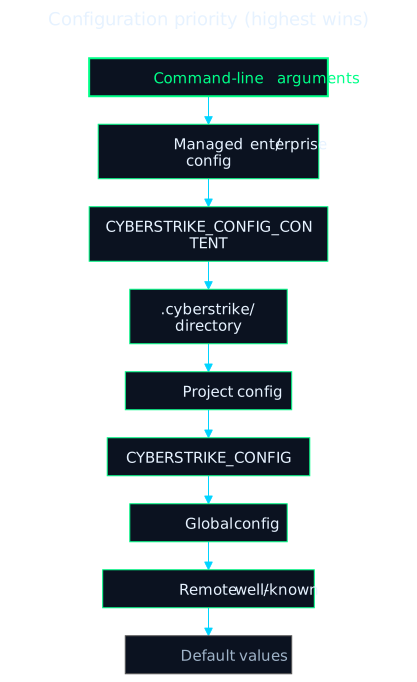
구성 계층
구성 소스는 우선순위 순서로 병합됩니다 (가장 높은 우선순위가 적용):
- 명령줄 인수
- 관리(엔터프라이즈) 설정 — 관리 디렉토리의 관리자 제어
cyberstrike.json/cyberstrike.jsonc CYBERSTRIKE_CONFIG_CONTENT환경 변수 (인라인 JSON).cyberstrike/디렉토리 설정 — 프로젝트의.cyberstrike/, 그리고 홈 디렉토리의~/.cyberstrike/- 프로젝트 설정 (
./cyberstrike.json또는./cyberstrike.jsonc, 작업 디렉토리에서 상위로 탐색) - 커스텀 설정 경로 (
CYBERSTRIKE_CONFIG) - 전역 설정 (
~/.config/cyberstrike/config.json,cyberstrike.json, 또는cyberstrike.jsonc) - 원격 / well-known 설정
- 기본값
구성 검사
모든 소스가 병합된 후 적용된 구성을 확인하려면:
cyberstrike debug config해결된 구성을 JSON으로 출력합니다. config get/set 명령어는 없습니다 — 설정 파일을 직접 편집하여 설정을 변경합니다 (아래 참조).
설정 파일
프로젝트 구성
프로젝트 루트에 cyberstrike.json 또는 cyberstrike.jsonc를 생성합니다:
{ "$schema": "https://cyberstrike.io/config.json", "model": "anthropic/claude-sonnet-4-20250514", "agent": { "web-application": { "model": "anthropic/claude-sonnet-4-20250514" } }}전역 구성
~/.config/cyberstrike/에 사용자 전체 설정을 저장합니다. config.json, cyberstrike.json, cyberstrike.jsonc 중 어느 것이든 로드됩니다 (Cyberstrike가 config.json을 자동 생성):
{ "$schema": "https://cyberstrike.io/config.json", "theme": "cyberstrike", "autoupdate": true, "share": "manual"}프로젝트 디렉토리 구조
체계적인 구성을 위해 .cyberstrike/ 디렉토리를 생성합니다:
.cyberstrike/├── cyberstrike.json # 프로젝트 설정├── agents/ # 커스텀 에이전트│ └── security.md├── commands/ # 커스텀 명령│ └── scan.md├── plugins/ # 커스텀 플러그인│ └── my-plugin.ts└── modes/ # 커스텀 모드 (지원 중단)핵심 설정
모델 선택
기본 AI 모델을 설정합니다:
{ "model": "anthropic/claude-sonnet-4-20250514"}형식: provider/model-name
경량 모델
경량 작업(제목 생성)을 위한 모델을 설정합니다:
{ "small_model": "anthropic/claude-haiku-4-5-20251001"}기본 에이전트
기본 보안 에이전트를 설정합니다:
{ "default_agent": "cyberstrike"}사용자 이름
시스템 사용자 이름을 재정의합니다:
{ "username": "pentester"}테마
인터페이스 테마를 설정합니다:
{ "theme": "cyberstrike"}제공자 구성
AI 제공자를 개별적으로 구성합니다:
{ "provider": { "anthropic": { "options": { "apiKey": "{env:ANTHROPIC_API_KEY}", "timeout": 300000 } }, "openai": { "options": { "baseURL": "https://api.openai.com/v1" }, "whitelist": ["gpt-4o", "gpt-4-turbo"], "blacklist": ["gpt-3.5-turbo"] }, "custom-provider": { "id": "custom-provider", "name": "Custom Provider", "options": { "baseURL": "https://api.custom.example.com/v1", "apiKey": "{env:CUSTOM_API_KEY}" } } }}제공자 옵션
| 옵션 | 타입 | 설명 |
|---|---|---|
apiKey | string | 인증을 위한 API 키 |
baseURL | string | 커스텀 API 엔드포인트 |
timeout | number/false | 요청 타임아웃 (ms) (기본값: 300000) |
setCacheKey | boolean | 프롬프트 캐시 키 활성화 |
enterpriseUrl | string | Copilot용 GitHub Enterprise URL |
모델 필터링
표시되는 모델을 제어합니다:
{ "provider": { "openai": { "whitelist": ["gpt-4o", "o1-preview"], "blacklist": ["gpt-3.5-turbo"] } }}제공자 비활성화
특정 제공자를 비활성화합니다:
{ "disabled_providers": ["ollama", "groq"]}특정 제공자만 활성화합니다:
{ "enabled_providers": ["anthropic", "openai"]}에이전트 구성
에이전트 동작을 구성합니다:
{ "agent": { "cyberstrike": { "model": "anthropic/claude-sonnet-4-20250514", "temperature": 0.7, "steps": 50, "color": "#FF5733" }, "web-application": { "model": "anthropic/claude-opus-4-20250514", "prompt": "Focus on OWASP Top 10 vulnerabilities" } }}에이전트 옵션
| 옵션 | 타입 | 설명 |
|---|---|---|
model | string | 이 에이전트의 모델 재정의 |
temperature | number | 모델 온도 (0-1) |
top_p | number | Top-p 샘플링 값 |
steps | number | 최대 에이전트 반복 횟수 |
prompt | string | 커스텀 시스템 프롬프트 |
color | string | Hex 색상 코드 (#RRGGBB) |
description | string | 에이전트 설명 |
mode | string | 에이전트 모드: “primary”, “subagent”, “all” |
hidden | boolean | 자동완성에서 숨기기 |
disable | boolean | 이 에이전트 비활성화 |
커스텀 에이전트 만들기
.cyberstrike/agents/custom.md를 생성합니다:
---description: Custom security agent for API testingmodel: anthropic/claude-opus-4-20250514mode: primary---
You are an API security specialist. Focus on:- Authentication vulnerabilities- Authorization bypass- Input validation- Rate limiting issues
MCP 구성
Model Context Protocol 서버를 구성합니다:
{ "mcp": { "filesystem": { "type": "local", "command": ["npx", "@modelcontextprotocol/server-filesystem", "/path/to/dir"], "enabled": true, "timeout": 5000 }, "remote-api": { "type": "remote", "url": "https://api.example.com/mcp", "oauth": { "clientId": "your-client-id", "scope": "read write" } } }}로컬 MCP 서버
| 옵션 | 타입 | 설명 |
|---|---|---|
type | “local” | 서버 유형 |
command | string[] | 명령어와 인수 |
environment | object | 환경 변수 |
enabled | boolean | 서버 활성화/비활성화 |
timeout | number | 요청 타임아웃 (ms) |
원격 MCP 서버
| 옵션 | 타입 | 설명 |
|---|---|---|
type | “remote” | 서버 유형 |
url | string | 서버 URL |
headers | object | 요청 헤더 |
oauth | object/false | OAuth 구성 |
enabled | boolean | 서버 활성화/비활성화 |
timeout | number | 요청 타임아웃 (ms) |
OAuth 구성
{ "oauth": { "clientId": "your-client-id", "clientSecret": "your-client-secret", "scope": "read write" }}권한 구성
도구 권한을 제어합니다:
{ "permission": { "bash": "ask", "edit": "allow", "read": "allow", "glob": "allow", "grep": "allow", "websearch": "deny" }}권한 동작
| 동작 | 설명 |
|---|---|
ask | 사용자에게 승인 요청 (기본값) |
allow | 질문 없이 자동 승인 |
deny | 도구 사용 차단 |
패턴 기반 권한
패턴별로 권한을 지정합니다:
{ "permission": { "bash": { "*": "ask", "ls *": "allow", "rm -rf *": "deny" }, "edit": { "*": "ask", "*.md": "allow" } }}사용 가능한 권한 키
| 키 | 설명 |
|---|---|
read | 파일 읽기 |
edit | 파일 편집/쓰기 |
glob | 파일 패턴 매칭 |
grep | 내용 검색 |
list | 디렉토리 나열 |
bash | 명령어 실행 |
task | 작업 실행 |
websearch | 웹 검색 |
webfetch | URL 가져오기 |
lsp | LSP 작업 |
external_directory | 프로젝트 외부 접근 |
키바인딩
키보드 단축키를 커스터마이즈합니다:
{ "keybinds": { "leader": "ctrl+x", "app_exit": "ctrl+c,ctrl+d", "session_new": "<leader>n", "session_list": "<leader>l", "model_list": "<leader>m", "agent_list": "<leader>a", "input_submit": "return", "input_newline": "shift+return,ctrl+return" }}키 형식
- 단일 키:
ctrl+c,escape,return - 여러 바인딩:
ctrl+c,ctrl+d(쉼표로 구분) - 리더 시퀀스:
<leader>n(리더 키 사용) - 비활성화:
none
TUI 설정
터미널 인터페이스를 구성합니다:
{ "tui": { "scroll_speed": 1.0, "scroll_acceleration": { "enabled": true }, "diff_style": "auto" }}| 옵션 | 타입 | 설명 |
|---|---|---|
scroll_speed | number | 스크롤 속도 배율 |
scroll_acceleration | object | 가속 설정 |
diff_style | “auto”/“stacked” | 차이 렌더링 스타일 |
서버 구성
API 서버를 구성합니다:
{ "server": { "port": 4096, "hostname": "localhost", "mdns": true, "cors": ["https://example.com"] }}플러그인 및 훅
Cyberstrike는 설정 기반 훅 시스템을 사용하지 않습니다. 자동화 및 생명주기 훅은 플러그인으로 구현됩니다 — tool.execute.before, tool.execute.after, permission.ask 등의 이벤트를 구독하는 JavaScript/TypeScript 모듈입니다.
이름으로 플러그인을 등록합니다. npm 또는 .cyberstrike/ 내의 로컬 {plugin,plugins}/ 디렉토리에서 해석됩니다:
{ "plugin": ["my-plugin", "@scope/another-plugin"]}전체 이벤트 목록과 작성 가이드는 훅 및 플러그인을 참조하세요.
실험적 옵션
experimental 블록은 옵트인 기능을 노출합니다:
{ "experimental": { "batch_tool": true, "openTelemetry": false, "continue_loop_on_deny": false, "mcp_timeout": 5000 }}| 옵션 | 타입 | 설명 |
|---|---|---|
disable_paste_summary | boolean | 붙여넣기 요약 비활성화 |
batch_tool | boolean | 배치 도구 활성화 |
openTelemetry | boolean | AI SDK 호출에 OpenTelemetry 스팬 활성화 |
primary_tools | string[] | 기본 에이전트에만 사용 가능한 도구 |
continue_loop_on_deny | boolean | 도구 호출이 거부되었을 때 에이전트 루프 계속 |
mcp_timeout | number | MCP 요청 타임아웃 (ms) |
공유 구성
세션 공유를 제어합니다:
{ "share": "manual"}| 값 | 설명 |
|---|---|
manual | 명령으로만 공유 |
auto | 새 세션 자동 공유 |
disabled | 모든 공유 비활성화 |
압축 설정
컨텍스트 압축을 구성합니다:
{ "compaction": { "auto": true, "prune": true }}| 옵션 | 설명 |
|---|---|
auto | 컨텍스트가 가득 찼을 때 자동 압축 |
prune | 오래된 도구 출력 정리 |
환경 변수
구성 변수
| 변수 | 설명 |
|---|---|
CYBERSTRIKE_CONFIG | 커스텀 설정 파일 경로 |
CYBERSTRIKE_CONFIG_CONTENT | 인라인 JSON 설정 |
CYBERSTRIKE_CONFIG_DIR | 추가 설정 디렉토리 |
CYBERSTRIKE_DISABLE_PROJECT_CONFIG | 프로젝트 설정 무시 |
CYBERSTRIKE_PERMISSION | JSON 권한 재정의 |
제공자 API 키
| 변수 | 제공자 |
|---|---|
ANTHROPIC_API_KEY | Anthropic |
OPENAI_API_KEY | OpenAI |
GOOGLE_GENERATIVE_AI_API_KEY | Google (Gemini) |
OPENROUTER_API_KEY | OpenRouter |
AWS_ACCESS_KEY_ID | AWS Bedrock |
AZURE_API_KEY | Azure OpenAI |
동작 플래그
| 변수 | 설명 |
|---|---|
CYBERSTRIKE_AUTO_SHARE | 세션 자동 공유 |
CYBERSTRIKE_DISABLE_AUTOCOMPACT | 자동 압축 비활성화 |
CYBERSTRIKE_DISABLE_PRUNE | 출력 정리 비활성화 |
변수 치환
환경 변수
설정에서 환경 변수를 참조합니다:
{ "provider": { "anthropic": { "options": { "apiKey": "{env:ANTHROPIC_API_KEY}" } } }}파일 참조
파일에서 내용을 포함합니다:
{ "instructions": ["{file:./SECURITY.md}"]}지원하는 경로:
- 상대 경로:
{file:./path/to/file} - 절대 경로:
{file:/absolute/path} - 홈 디렉토리:
{file:~/path/from/home}
LSP 구성
Language Server Protocol을 구성합니다:
{ "lsp": { "typescript": { "command": ["typescript-language-server", "--stdio"], "extensions": [".ts", ".tsx"] }, "rust": { "disabled": true } }}모든 LSP 기능을 비활성화하려면 lsp: false로 설정합니다.
포매터 구성
코드 포매터를 구성합니다:
{ "formatter": { "prettier": { "command": ["prettier", "--write"], "extensions": [".ts", ".tsx", ".js", ".jsx"] }, "rustfmt": { "disabled": true } }}모든 포매터를 비활성화하려면 formatter: false로 설정합니다.
전체 예시
{  "$schema": "https://cyberstrike.io/config.json",  "model": "anthropic/claude-sonnet-4-20250514",  "small_model": "anthropic/claude-haiku-4-5-20251001",  "default_agent": "cyberstrike",  "theme": "cyberstrike",  "share": "manual",  "autoupdate": "notify",
  "provider": {    "anthropic": {      "options": {        "timeout": 300000      }    }  },
  "agent": {    "web-application": {      "model": "anthropic/claude-opus-4-20250514",      "steps": 100    }  },
  "permission": {    "bash": "ask",    "edit": "allow",    "read": "allow"  },
  "mcp": {    "filesystem": {      "type": "local",      "command": ["npx", "@modelcontextprotocol/server-filesystem", "."],      "enabled": true    }  },
  "keybinds": {    "leader": "ctrl+x"  },
  "compaction": {    "auto": true,    "prune": true  }}