OpenAI (GPT)
OpenAI provides the GPT-5 family, GPT-4.1, and the o-series reasoning models for security analysis. This guide covers setup and configuration.
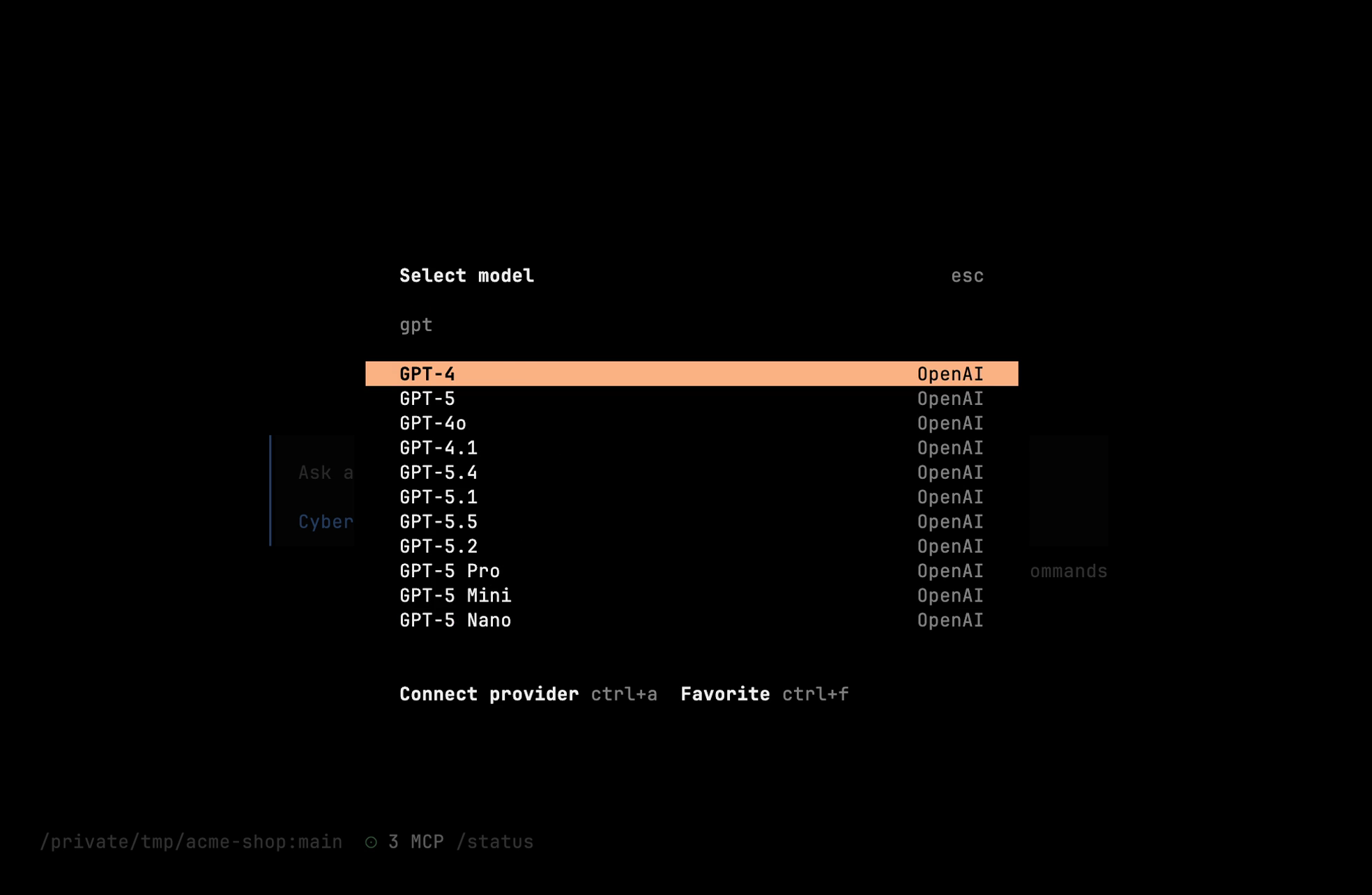
Available Models
Cyberstrike pulls its model catalog live from models.dev, so the exact list tracks what OpenAI currently offers. Common picks:
| Model | Context | Best for |
|---|---|---|
openai/gpt-5 | 400K | General security testing (flagship) |
openai/gpt-5-mini | 400K | Quick tasks, high volume |
openai/gpt-5-nano | 400K | Cheapest, simple tasks |
openai/gpt-4.1 | 1M | Very large context |
openai/o3 | 200K | Deep step-by-step reasoning |
Tip
The newer GPT-5.x releases (5.1–5.5, plus the Codex and Pro variants) appear automatically as models.dev updates. Run /models in the TUI — or cyberstrike models — for the full current list.
Authentication
API Key Setup
- Get your API key from platform.openai.com
- Run authentication:
cyberstrike auth login# Select: OpenAI# Enter your API keyEnvironment Variable
export OPENAI_API_KEY="sk-proj-..."Configuration File
{ "provider": { "openai": { "options": { "apiKey": "{env:OPENAI_API_KEY}" } } }}Model Configuration
Set Default Model
{ "model": "openai/gpt-5"}Command Line Override
cyberstrike --model openai/gpt-5-proUsing Reasoning Models
The o-series (o3, o4-mini) and the GPT-5 Pro variants excel at complex security analysis:
cyberstrike --model openai/o3Best for:
- Complex vulnerability chains
- Attack path analysis
- Cryptographic analysis
- Reverse engineering
ChatGPT Plus/Pro
Use your ChatGPT subscription:
cyberstrike auth login# Select: OpenAI# Choose: ChatGPT Plus/Pro# Complete browser authenticationInfo
ChatGPT authentication requires browser-based OAuth flow.
Organization ID
For organization accounts:
{ "provider": { "openai": { "options": { "apiKey": "{env:OPENAI_API_KEY}", "organization": "org-..." } } }}Custom Base URL
For OpenAI-compatible endpoints:
{ "provider": { "openai": { "options": { "baseURL": "https://your-endpoint.com/v1" } } }}Function Calling
GPT models support function calling for tool use:
{ "provider": { "openai": { "options": { "parallelToolCalls": true } } }}Rate Limits
OpenAI rate limits by tier:
| Tier | RPM | TPM |
|---|---|---|
| Free | 3 | 40,000 |
| Tier 1 | 500 | 200,000 |
| Tier 2 | 5,000 | 2,000,000 |
| Tier 3+ | Higher limits |
Handling Limits
{ "provider": { "openai": { "options": { "maxRetries": 3, "timeout": 60000 } } }}Best Practices
Model Selection
| Task | Recommended Model |
|---|---|
| Quick scans | gpt-5-nano |
| General testing | gpt-5 |
| Complex analysis | o3 |
| Cost-sensitive | gpt-5-mini |
Cost Optimization
- Use mini models for simple tasks
- Set reasonable max tokens
- Use
/compactfor long sessions - Monitor usage on OpenAI dashboard
Security
- Store keys in environment variables
- Use project-specific API keys
- Enable usage limits in OpenAI dashboard
- Rotate keys periodically
Troubleshooting
Invalid API Key
Error: Incorrect API key providedVerify:
- Key starts with
sk-proj-orsk- - No extra whitespace
- Key is active
Insufficient Quota
Error: You exceeded your current quotaSolutions:
- Add billing information
- Check usage limits
- Upgrade your plan
Model Access
Error: The model does not exist or you do not have accessSome models require:
- A higher usage tier for the newest flagships
- Waitlist approval
- Enterprise agreement
Caution
Reasoning models (the o-series and GPT-5 Pro variants) have higher latency due to reasoning steps. Plan for longer response times.
Related Documentation
- Providers Overview - All providers
- Custom Providers - OpenAI-compatible setup
- Configuration - Full options