Anthropic (Claude)
Anthropic’s Claude models provide advanced reasoning capabilities for security analysis. This guide covers configuration and best practices.
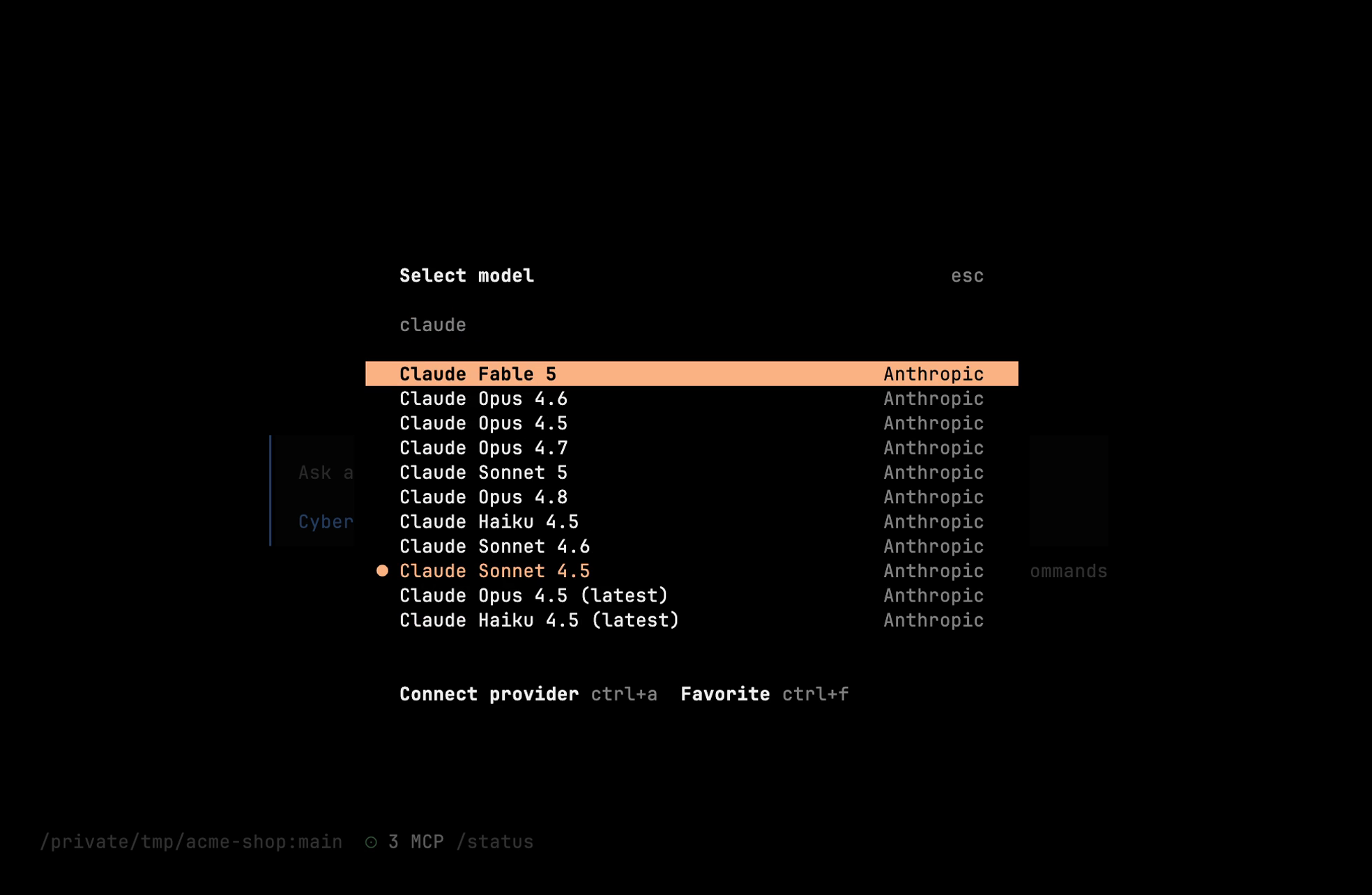
Available Models
Cyberstrike pulls its model catalog live from models.dev, so the exact list tracks what Anthropic currently offers. Common picks:
| Model | Context | Best for |
|---|---|---|
anthropic/claude-opus-4-5 | 200K | Deepest reasoning — complex analysis, exploit research |
anthropic/claude-sonnet-4-5 | 200K | Balanced default — general security testing |
anthropic/claude-haiku-4-5 | 200K | Fast, low-cost — quick scans, high volume |
Tip
Newer flagships (Opus 4.6/4.7/4.8, Sonnet 4.6/5, Fable 5) and every other Claude model appear automatically as models.dev updates. Run /models in the TUI — or cyberstrike models — for the full current list. Append -latest aliases (e.g. claude-opus-4-5) track the newest release in a family; dated IDs (e.g. claude-opus-4-5-20251101) pin a specific version.
Authentication
API Key Setup
- Get your API key from console.anthropic.com
- Run the authentication command:
cyberstrike auth login# Select: Anthropic# Enter your API keyEnvironment Variable
export ANTHROPIC_API_KEY="sk-ant-..."Add to your shell profile for persistence:
echo 'export ANTHROPIC_API_KEY="sk-ant-..."' >> ~/.zshrcConfiguration File
{ "provider": { "anthropic": { "options": { "apiKey": "{env:ANTHROPIC_API_KEY}" } } }}Model Configuration
Set Default Model
{ "model": "anthropic/claude-sonnet-4-5"}Command Line Override
cyberstrike --model anthropic/claude-opus-4-5In-Session Switching
In the TUI, run /models to open the model picker (bound to the “Switch model” command).
Extended Thinking
Enable extended thinking for complex security analysis:
{ "provider": { "anthropic": { "options": { "thinking": { "type": "enabled", "budgetTokens": 10000 } } } }}When to Use Extended Thinking
- Complex vulnerability chains
- Multi-step attack planning
- Code review with deep analysis
- Architecture security review
Token usage
In the session TUI header, CyberStrike shows context usage for the most recent assistant message with non-zero output tokens: a token total (input, output, reasoning, and cache read/write) and, when the model defines a context limit, a percentage of that limit. It also shows estimated session cost in USD as the sum of cost on assistant messages.
Prompt caching
For direct Anthropic models (providerID / SDK npm @ai-sdk/anthropic), CyberStrike adds Anthropic ephemeral cache control to selected system and recent messages when building the request. There is no separate cacheControl flag in provider.anthropic.options for this behavior.
Rate limits
Rate limits depend on your Anthropic account and product; refer to Anthropic’s documentation for current quotas.
For retryable API errors, CyberStrike uses exponential backoff (starting at 2s, doubling per attempt, capped at 30s when no Retry-After headers are present) and honors Retry-After / Retry-After-Ms when the provider returns them.
Best Practices
Model Selection
| Task | Recommended Model |
|---|---|
| Quick recon | claude-haiku-4-5 |
| Web app testing | claude-sonnet-4-5 |
| Complex exploits | claude-opus-4-5 |
| Code review | claude-sonnet-4-5 |
Cost Optimization
- Use Haiku for repetitive tasks
- Use
/compact(or/summarize) for long sessions - Limit context with focused prompts
Security
- Never commit API keys to repositories
- Use environment variables
- Rotate keys periodically
- Monitor usage on Anthropic dashboard
Troubleshooting
Invalid API Key
Error: Invalid API keyVerify your key:
- Matches the format described when connecting Anthropic in the app (API keys typically start with
sk-ant-api…) - No trailing whitespace
- Key is active in console.anthropic.com/settings/keys
Rate Limit Exceeded
Error: Rate limit exceededSolutions:
- Wait and retry
- Upgrade your tier
- Use smaller context
Model Not Available
Error: Model not foundCheck model ID is correct and available in your region.
Tip
Use Claude Sonnet for most security testing tasks. Reserve Opus for complex analysis requiring deeper reasoning.
Related Documentation
- Providers Overview - All supported providers
- Configuration - Full configuration options
- Authentication - Setup guide