Automation
In non-interactive runs (cyberstrike run), there is nobody to answer permission prompts — so any tool that would prompt is auto-rejected. To let a pipeline do real work, pre-approve the tools it needs.
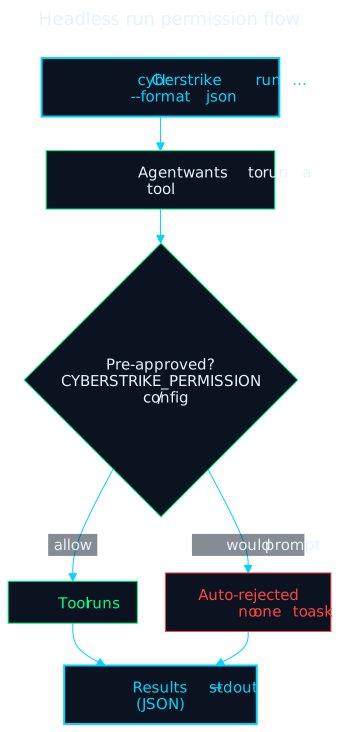
Pre-Approving Tools
There is no “auto mode” flag. Grant permissions two ways:
1. CYBERSTRIKE_PERMISSION env var — a JSON permission map (same shape as the config permission field):
export CYBERSTRIKE_PERMISSION='{"bash":"allow","read":"allow","edit":{"reports/**":"allow"}}'cyberstrike run "scan this codebase for security issues" --format json > report.json2. Config permission — commit safe defaults, deny the dangerous bits (see Patterns):
{ "permission": { "read": "allow", "bash": { "*": "allow", "rm -rf *": "deny", "sudo *": "deny" }, "edit": { "reports/**": "allow", ".env*": "deny" } }}Output goes to stdout; use --format json for machine-readable results.
CI/CD Integration
GitHub Actions
name: Security Scanon:  pull_request:    branches: [main]
jobs:  scan:    runs-on: ubuntu-latest    steps:      - uses: actions/checkout@v4      - uses: actions/setup-node@v4        with:          node-version: '20'      - run: npm install -g @cyberstrike-io/cyberstrike@latest      - name: Run Security Scan        env:          ANTHROPIC_API_KEY: ${{ secrets.ANTHROPIC_API_KEY }}          CYBERSTRIKE_PERMISSION: '{"bash":"allow","read":"allow","edit":{"reports/**":"allow"}}'        run: cyberstrike run "scan this codebase for security vulnerabilities" --format json > security-report.json      - uses: actions/upload-artifact@v4        with:          name: security-report          path: security-report.json
GitLab CI
security-scan: image: node:20 variables: CYBERSTRIKE_PERMISSION: '{"bash":"allow","read":"allow"}' script: - npm install -g @cyberstrike-io/cyberstrike@latest - cyberstrike run "analyze code for vulnerabilities" --format json > report.json artifacts: paths: - report.jsonBatch & Scheduled Runs
Loop over targets, or drive it from cron — the same CYBERSTRIKE_PERMISSION (or config) rules apply:
#!/bin/bashexport CYBERSTRIKE_PERMISSION='{"bash":"allow"}'while read -r target; do cyberstrike run "scan $target for open ports and services" --format json > "reports/${target}.json"done < targets.txt# Daily scan at 02:000 2 * * * CYBERSTRIKE_PERMISSION='{"bash":"allow"}' /usr/local/bin/cyberstrike run "daily security scan" >> /var/log/cyberstrike.log 2>&1Exit Codes & Output
cyberstrike run writes results to stdout (--format json for JSON) and returns 0 on success, a non-zero code on error or interruption. Parse the JSON for findings:
cyberstrike run "scan target" --format json | jq '.'Security Considerations
- Least privilege — only
allowthe tools the job needs; keep an explicitdenyforrm -rf *,sudo *, and secret paths. - Secrets — inject API keys from your CI secret store, never commit them.
- Isolation — run in a container with a constrained network where possible.
Caution
Always keep deny rules for destructive commands when pre-approving bash in automation.
Related Documentation
- Permissions Overview - The permission model and keys
- Patterns - Glob pattern syntax
- Environment Variables -
CYBERSTRIKE_PERMISSION - CLI Run Command - Non-interactive execution