OAuth Configuration
OAuth lets Cyberstrike authenticate with a remote MCP server without storing long-lived credentials. Cyberstrike discovers the server’s OAuth endpoints automatically — you only supply client details when the server requires them.
Configuration Schema
OAuth is an optional block on a remote MCP server. The full schema is just three optional fields:
{ "mcp": { "my-server": { "type": "remote", "url": "https://mcp.example.com/mcp", "oauth": { "clientId": "{env:OAUTH_CLIENT_ID}", "clientSecret": "{env:OAUTH_CLIENT_SECRET}", "scope": "read write" } } }}| Field | Type | Description |
|---|---|---|
clientId | string | Optional. If omitted, dynamic client registration (RFC 7591) is attempted. |
clientSecret | string | Optional. Only if the authorization server requires a confidential client. |
scope | string | Optional. Scopes to request during authorization. |
Caution
The authorization and token URLs are not configured here — Cyberstrike discovers them from the server’s OAuth metadata. Fields like authorizationUrl, tokenUrl, pkce, deviceAuthorizationUrl, grantType, and callbackPort/callbackPath do not exist in the schema (clientId, clientSecret, scope only).
How It Works
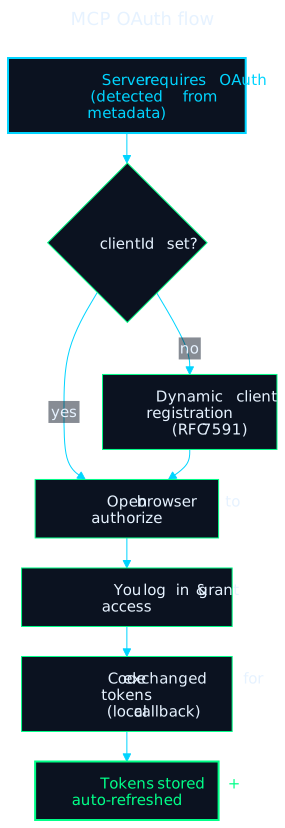
- Cyberstrike detects that the remote server requires OAuth (from its metadata).
- If no
clientIdis set, it registers a client dynamically (RFC 7591). - It opens your browser to the authorization URL; you log in and grant access.
- The authorization code is exchanged for tokens on a local callback handled internally.
- Tokens are stored by Cyberstrike and refreshed automatically when they expire.
Set "oauth": false on the server to opt out of OAuth auto-detection entirely.
Authorizing a Server
Trigger authorization from the CLI:
cyberstrike mcp auth <name> # authorize a servercyberstrike mcp auth list # list OAuth-authorized serverscyberstrike mcp logout <name> # remove stored OAuth credentialsCyberstrike also prompts for authorization automatically the first time an OAuth-protected server is used in a session. Token refresh is automatic — there is no manual refresh command.
Example: a scoped server
{ "mcp": { "example-mcp": { "type": "remote", "url": "https://mcp.example.com/mcp", "oauth": { "scope": "openid profile email" } } }}With no clientId, Cyberstrike registers a client dynamically, then authorizes with the requested scopes.
Security Notes
- Reference secrets with
{env:VAR}— never commit aclientSecretto version control. - Request the minimum scopes the server needs.
- Remove credentials with
cyberstrike mcp logout <name>when they’re no longer needed.
Troubleshooting
- Authorization failed — confirm the server URL is reachable and (if the server needs a confidential client) that
clientId/clientSecretare correct. - Repeated auth prompts — the stored token may have been revoked server-side; run
cyberstrike mcp auth <name>again. - Callback timeout — ensure your browser completed the login and that a local firewall isn’t blocking the loopback callback.
- Inspect a server’s connection with
cyberstrike mcp debug <name>.
Related Documentation
- Remote Servers - Remote MCP configuration
- Bolt / MCP Overview - Architecture and concepts
- Configuration - Full configuration options